
Configure an LTI Discussion Provider#
You can use a third-party discussion tool as the Discussion page in a course. Open edX supports these discussion providers through LTI 1.1:
Ed Discussion
InScribe
Piazza
Yellowdig
Note
Only an Open edX global administrator can select, configure, or change a third-party discussion provider.
Configure a discussion provider#
Warning
A discussion provider might require the usernames or email addresses of learners and course staff. Review your organization’s privacy and data policies before enabling PII sharing.
Enable LTI PII sharing for the course. See Manage LTI PII Sharing for a Course.
In the Studio header, select Content, then Pages & Resources.
On the Discussion card, select the settings icon.
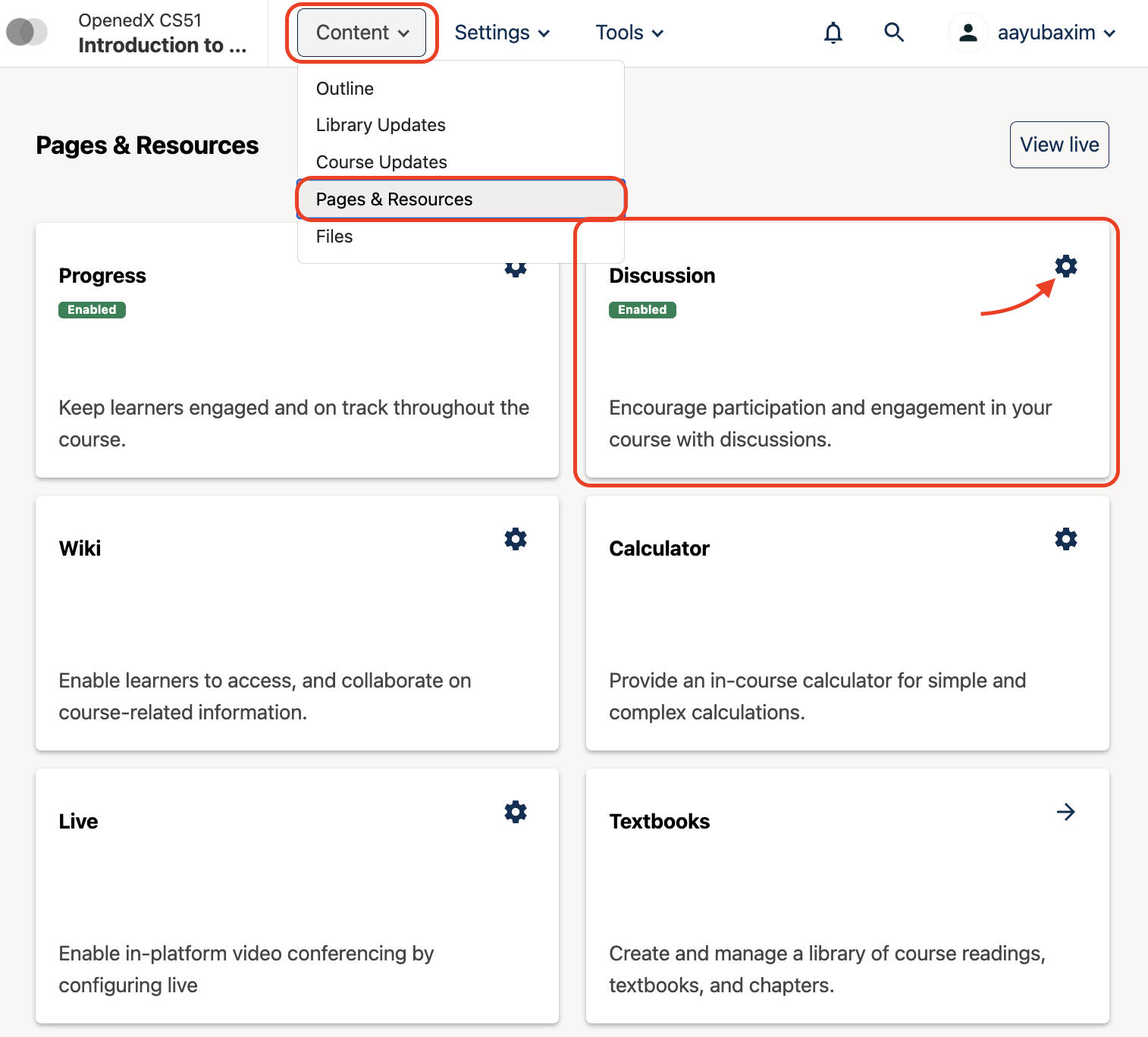
Select the third-party discussion provider.
Select Next.
Enter the Consumer Key, Consumer Secret, and Launch URL supplied by the provider.
Select Save.
The Discussion page in the course navigation now shows the third-party tool in place of the platform’s built-in discussions.
Maintenance chart
Review Date |
Working Group Reviewer |
Release |
Test situation |
2026-07-31 |
Aamir Ayub |
Verawood |
Pass |