
Open edX Verawood Developer & Operator Release Notes#
These are the developer & operator release notes for the Verawood release, the 22nd community release of the Open edX Platform, spanning changes from October 30, 2025 to April 9, 2026. You can also review details about Open edX Platform Release Notes or learn more about the Open edX Platform.
To view the end-user facing docs, see the Open edX Verawood Release - Product Release Notes.
Breaking Changes#
HELP_TOKENS_BOOKSandhelp_tokens.ininow reference the official Open edX documentation.The
HELP_TOKENS_BOOKSsetting has been updated to reference the official Open edX documentation. Similarly, thehelp_tokens.inifile, which is specified in theHELP_TOKENS_INI_FILEsetting, was updated in both the LMS and CMS configurations to ensure the paths align with the official Open edX documentation.This is a breaking change that many operators may want, but if you wish to retain the original values, you must provide overrides. See Update HELP_TOKENS_BOOKS to use official Open edX docs.
edx-search Typesense server requirement update. The
typesense-pythonclient library was upgraded from 1.x to 2.0.0. This version is only compatible with Typesense Server >= v30.0.Action required if you use the Typesense search backend (
SEARCH_ENGINE =
"search.typesense.TypesenseEngine"
): upgrade your Typesense server to v30.0 or later before deploying this Open edX release. No action is needed if you use the default Elasticsearch backend. See edx-search PR #254 and the typesense-python compatibility matrix for details.Upgrade/upsell (“notifications”) panel replaced in Learning MFE. The Learning MFE right sidebar now uses a configurable widget registry, and the upgrade/upsell widget was renamed internally from “Notifications” to “Upgrade.”
The Upgrade widget remains enabled by default in Verawood; operators do not need to add it to
SIDEBAR_WIDGETS. To disable it, configureSIDEBAR_WIDGETS: [{ id: 'UPGRADE', enabled: false }].Plugin developers should migrate the old notification-tray slot to the Upgrade Panel slot, and the old discussions-sidebar slots to the Right Sidebar and Right Sidebar Trigger slots. Deprecated aliases remain compatible for now.
Upgrade widget
localStoragekeys were renamed and are not migrated, so stored widget state may reset after upgrading.See the Upgrade Widget migration notes for configuration examples and the complete identifier mapping.
Notifications and notification emails are now enabled by default. The previous opt-in waffle flags,
notifications.enable_notificationsandnotifications.enable_email_notifications, have been replaced by opt-out flags. Operators who need to keep notifications disabled after upgrading must enablenotifications.disable_notificationsornotifications.disable_email_notifications.notifications.disable_notifications(defaultFalse): when enabled, disables the Notifications feature; when unset, notifications are enabled by default.notifications.disable_email_notifications(defaultFalse): when enabled, disables notification emails; when unset, notification emails are enabled by default.notifications.enable_notificationsandnotifications.enable_email_notificationshave been removed; they are replaced by the flags above.
Migrations to be aware of#
A few migrations in this release touch existing data at scale, run automatically without an explicit opt-in, or can fail depending on your instance’s data history. Review these before upgrading.
Course ID case-insensitive uniqueness constraint. Due to a bug that was present in the last several releases, it was possible for users to create multiple courses with similar course IDs that differed only in capitalization. Such courses would only appear as a single course in most parts of the system, and may not work properly at all. That bug has been fixed, and a new database constraint will prevent that from happening going forward.
However, if you have any of these “case duplicate” courses, the
split_modulestore_djangomigration0004_courseid_unique_ciwill fail with anIntegrityError. If you encounter this, follow the instructions to delete the invalid course record(s), and then you should be able to apply the migration and continue. See fix!: split modulestore’s has_course(ignore_case=True) was not working.MariaDB UUID column conversion (edx-enterprise). If you run MariaDB, upgrading
edx-enterpriseruns a migration that converts roughly 19 UUID columns fromchar(32)to MariaDB’s nativeuuidtype, with no flag to skip it. This includes enrollment and group-membership tables (enterprise_licensedenterprisecourseenrollment,enterprise_enterprisecourseentitlement,enterprise_enterprisegroupmembership) that can be large on instances with many enterprise customers. Changing a column’s type this way forces MariaDB to rewrite the whole table (ALGORITHM=COPY), locking it for the duration. This migration is a no-op on PostgreSQL. See fix: Convert UUIDField columns to uuid type for MariaDB.AuthZ course-authoring role migration (openedx-authz). This is not a schema migration, it’s a signal-triggered data migration. Enabling the
authz.enable_course_authoringwaffle flag for an organization triggers, synchronously inside that save, a full migration of everyCourseAccessRolerow for that org into the new Casbin-based authorization model, wrapped in a single transaction. Cost scales with how many courses and role assignments the org has, and there’s no built-in batching. To control how much gets migrated at once, keepENABLE_AUTOMATIC_AUTHZ_COURSE_AUTHORING_MIGRATIONset toFalse(its default) and roll out with theauthz_migrate_course_authoringmanagement command instead, scoped with--course-id-listor--org-id. See feat: course authoring automatic migration.Catalog course/run backfill (course_overviews). A migration populates new
CatalogCourse/CourseRunmodels by iterating everyCourseOverviewrow, without batching. It can fail outright with aValueErrorif a course’s organization short code doesn’t match the Organizations table, which is plausible on instances with years of accumulated data drift (case mismatches, orgs created outside the normal flow). If it fails, the error names the offending course and organization; create the missing Organization record (Django admin) or setactive=Falseon it, then re-run the migration. See feat: update openedx-core: new catalog models + backfill migration.Enterprise academies auto-enabled for existing customers (edx-enterprise). Any enterprise customer that already has
enable_integrated_customer_learner_portal_search=Truegetsenable_academies=Trueautomatically. This is opt-out, not opt-in, and the reverse migration is an explicit no-op: there’s no way to determine or restore the prior state after the fact. See feat: enable academies by default for all enterprise customers with search.
Deprecations & Removals#
Custom edx-val storage settings deprecated in favor of Django STORAGES.
The
edx-valapplication previously relied on custom settings (VIDEO_IMAGE_SETTINGS,VIDEO_TRANSCRIPTS_SETTINGS, etc.) to determine storage backends. This behavior is now deprecated in favor of the standard Django 5.2+STORAGESconfiguration. The key within theSTORAGESconfig for a custom video transcript location isvideo_transcripts. See edx-val PR #593.As of Verawood:
edx-valnow correctly respects Django’sSTORAGESdict, giving it precedence over legacy per-feature storage settings.Custom
edx-valstorage settings will continue to function during the Verawood cycle but are officially deprecated and will be removed in a future release.Operators should migrate their storage configuration to Django’s
STORAGESformat to ensure forward compatibility.
Required action for operators:
Define the required
edx-valstorages inside Django’sSTORAGESdictionary (e.g., for transcripts, videos, and images).Remove or stop relying on deprecated
edx-val-specific storage configuration variables.Review any existing custom overrides in
lms/envs/common.pyor deployment-specific files to ensure compatibility.
Failure to migrate before the legacy settings are removed may result in incorrect storage backends being used.
The
SERVICE_VARIANTsetting is no longer set from the environment. The setting will be set to'cms'incms/envs/common.pyand to'lms'inlms/envs/common.pyregardless of any environment variable set.CMS settings
ID_VERIFICATION_SUPPORT_LINK,PASSWORD_RESET_SUPPORT_LINK,ACTIVATION_EMAIL_SUPPORT_LINK, andLOGIN_ISSUE_SUPPORT_LINKare now set to the value of theSUPPORT_SITE_LINKsetting. Previously they defaulted to''.The setting
USE_L10Nwas removed since it was removed in Django 5.0.Notifications
send_email_digestmanagement command deprecated. The command still exists, but it is now a no-op that emits a deprecation warning. Daily and weekly notification digests are now scheduled automatically with Celery when qualifying notifications are created. Operators who previously scheduledsend_email_digestwith cron should remove those cron jobs after upgrading. By default, daily digests are delivered at 17:00 UTC, and weekly digests are delivered on Monday at 17:00 UTC. See edx-platform PR #38185 and Configure Notification Email Delivery.NOTIFICATION_DAILY_DIGEST_DELIVERY_HOUR(default17): hour of day, in UTC, to send daily digest emails.NOTIFICATION_DAILY_DIGEST_DELIVERY_MINUTE(default0): minute of the hour to send daily digest emails.NOTIFICATION_WEEKLY_DIGEST_DELIVERY_DAY(default0): day of the week to send weekly digest emails, where0is Monday and6is Sunday.NOTIFICATION_WEEKLY_DIGEST_DELIVERY_HOUR(default17): hour of day, in UTC, to send weekly digest emails.NOTIFICATION_WEEKLY_DIGEST_DELIVERY_MINUTE(default0): minute of the hour to send weekly digest emails.
REGISTRATION_EXTENSION_FORM replaced. The
REGISTRATION_EXTENSION_FORMsetting will stop working starting with the next release. It has been replaced with thePROFILE_EXTENSION_FORMsetting.Previously, data was only stored as JSON in the
UserProfilemetafield. Moving forward, this information will also be stored in the custom model that extends the fields.Action for operators: to prevent extended user fields from appearing empty or outdated after the update, you may need to write and run a custom data migration script to move existing information from the
metafield to your custom model, and perform this migration before activating the newPROFILE_EXTENSION_FORMsetting. See edx-platform PR #37119 for more details.Course-level notification preferences removed. Integrations that read
CourseNotificationPreferencerecords should migrate to account-level notification preferences and the V3 preferences API. See the model deletion migration.``is_core`` notification preference flag removed. Notification preference configuration no longer uses the
is_coreflag or thecore_web,core_email, andcore_pushfields. Clients that consume notification preference configuration data should useuse_app_defaultsand the plain channel fields exposed by the V3 preferences API.Notification preferences V2 configuration API removed. The notification preferences V2 configuration API and its related manager classes have been removed. Integrations that called
/api/notifications/v2/configurations/should use/api/notifications/v3/configurations/instead.Removal of temporary SAML toggle. The SAML feature toggle previously introduced as a temporary safeguard no longer exists. Any configuration setting this toggle should be removed. See fix: removal of temporary saml toggle.
SchoolYourself and Concept XBlocks Deprecated: The following Open edX forked repositories have been archived and are no longer maintained. Operators should refer to their respective upstream repositories for continued support:
schoolyourself-xblockConceptXBlock
Deprecation of legacy built-in XBlock implementations. Several previously built-in XBlocks have been extracted from
edx-platforminto the shared xblocks-core repository, and the extracted implementations are used by default in Verawood. The legacy “built-in” block code is considered deprecated. Starting in Willow, the deprecated built-in implementations are planned to be removed fromedx-platform, leaving only the extracted variants inxblocks-core.The following blocks have been extracted and now live in
xblocks-core:HTML Block
Video Block
Problem Block
Word Cloud Block
Annotatable Block
LTI Block
Poll Block
If you encounter problems with the extracted blocks, you can temporarily revert to the built-in implementations using the feature flags in
openedx/envs/common.py, following the patternUSE_EXTRACTED_*_BLOCK(for example,USE_EXTRACTED_VIDEO_BLOCK).Consolidation of several XBlock packages into xblocks-extra. The following standalone XBlock packages have been consolidated into xblocks-extra. The following standalone repositories have been marked deprecated:
audio-xblockfeedback-xblockopenedx-xblock-image-modalxblock-qualtrics-surveyxblock-sql-graderxblock-submit-and-compare
Operators who have any of these packages installed should migrate to
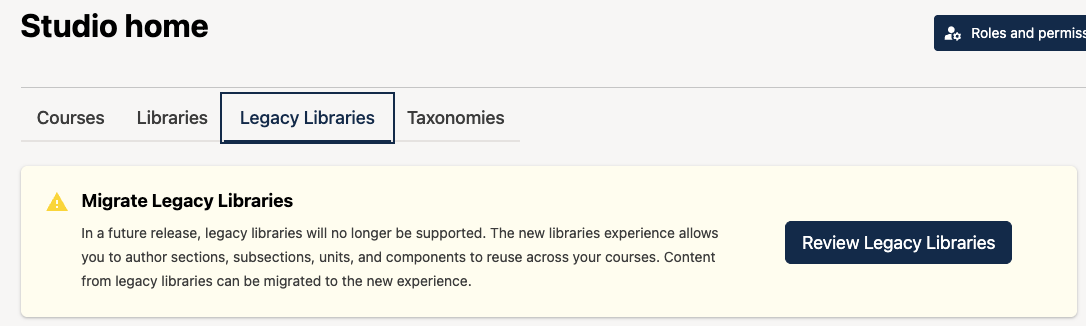
xblocks-extraand follow the migration guidelines.Legacy Libraries Deprecation: Legacy Libraries are now deprecated and must be migrated to Content Libraries this release.
Operators can see if any legacy libraries exist on their instance by visiting the “Legacy Libraries” tab on the Studio homepage, and clicking the Review Legacy Libraries button. Operators or course teams may perform the migration using the migration UI.
Aspects Analytics#
Upgrading to Aspects v4.0.0 will give you the latest Aspects functionality including Superset 6.0! See the upgrade instructions here: Upgrade Aspects.
This is a BREAKING CHANGE upgrade. Aspects will now use Python v3.12 which was introduced in the Tutor Verawood release.
Administrators & Operators#
PostgreSQL is now supported as a backend (fresh installs only). For more detail see the Use PostgreSQL how-to.
Notification preference defaults can now be managed at the instance level. Operators can override default preferences for existing notification applications and notification types without code changes. See Configure Default Notification Preferences.
NOTIFICATION_APPS_OVERRIDE(default{}): overrides default preferences for existing notification applications. Supported override keys areweb,email,push,non_editable, andemail_cadence.NOTIFICATION_TYPES_OVERRIDE(default{}): overrides default preferences for existing notification types. Supported override keys areweb,email,push,non_editable, andemail_cadence.
Immediate email notifications now use a configurable buffer window. The first notification is sent immediately; additional immediate-cadence notifications created inside the window are combined into one buffered digest.
NOTIFICATION_IMMEDIATE_EMAIL_BUFFER_MINUTES(default15): number of minutes to buffer additional immediate-cadence email notifications after the first immediate email is sent.
ORA reminder notifications are now available. Learners who submit an Open Response Assessment but still need to complete required peer or self review steps can receive
ora_reminderweb and email notifications. See Configure ORA Reminder Notifications.ENABLE_ORA_REMINDERS(defaultTrue): enables scheduled ORA reminder notifications for learners who need to complete peer or self reviews.ORA_REMINDER_MAX_COUNT(default3): maximum number of reminders sent per learner per ORA submission.ORA_REMINDER_INTERVAL_HOURS(default48): hours between consecutive ORA reminder notifications.ORA_REMINDER_INITIAL_DELAY_HOURS(default0): hours after submission before the first ORA reminder is sent.ORA_REMINDER_SWEEP_INTERVAL_SECONDS(default1800): how often the ORA reminder sweeper Celery task reschedules itself.ORA_REMINDER_SWEEP_BATCH_SIZE(default1000): maximum number of ORA reminder rows processed per sweep cycle.ORA_REMINDER_CHECK_AGAIN_HOURS(default12): hours to wait before checking again when no peer submissions are available.
Built-in pdf XBlock. The pdf XBlock is now built into the platform core and installed by default. If you previously installed a third-party pdf implementation such as open-craft’s
xblock-pdf, then the built-in implementation will likely work as a drop-in replacement, so you can uninstall the third-party implementation.If you’d rather continue using a third-party pdf implementation, then follow the steps to replace a preinstalled XBlock with a custom implementation. In either case, the third-party implementation must be removed from the
xblock.v1entrypoint, otherwise you will see anAmbiguousPluginError. Additionally, you will want to enable thelegacy_studio.pdf_editortoggle to allow the third-party pdf implementation to render its editor.New Instructor Dashboard MFE is the default experience. The new instructor dashboard MFE will be the default experience in Verawood. The
instructor.legacy_instructor_dashboardwaffle flag will disable the redirection that makes the new frontend app the default experience and revert to the legacy instructor dashboard.If you were using the
org.openedx.learning.instructor.dashboard.render.started.v1filter to modify the instructor dashboard tabs, you can achieve a similar outcome by usingorg.openedx.learning.instructor.dashboard.tabs.generated.v1, which will give you access to the API endpoint currently consumed to render the tabs on the frontend app. You’ll also need to add a widget to the proper slot to render the content. See the instructor dashboard MFE README for more details.Catalog MFE is the default experience. Introduced in Ulmo, the new Catalog MFE is now the default experience. Verawood will be the last release that supports the legacy experience; the legacy experience will be removed in Willow.
Enabling RBAC in Verawood#
RBAC AuthZ for Course Authoring (opt-in). Verawood introduces a new,
opt-in, RBAC-based authorization system for course authoring in Studio,
powered by openedx-authz.
This replaces the legacy CourseAccessRole-based permission model with a
more granular, role-based system. See ADR: AuthZ for Course Authoring
Implementation Plan.
This flag will be turned on by default in the next release, Willow, and the legacy permission system will be removed in Xylon (June 2027). To set up an individual course, a specific organization, or your whole site to use the new system, you need to both enable the appropriate feature flag(s) and run migrations.
Enabling the feature flag. The feature is controlled by the waffle flag
authz.enable_course_authoring, which can be enabled at three levels of granularity (course, organization, global). When disabled (the default), the legacy permission system remains in effect and no behavior changes.Course-level: add a “Waffle flag course override” at
/admin/waffle_utils/waffleflagcourseoverridemodel/forauthz.enable_course_authoring, with the course key, “Force On”/”Force Off”, marked “Enabled”.Org-level: add a “Waffle flag org override” at
/admin/waffle_utils/waffleflagorgoverridemodel/the same way, using the org short name.Global: add a Flag named
authz.enable_course_authoringat/admin/waffle/flag/with “Everyone” set to “Yes”.Course and org overrides work as overrides over the global flag, not independent switches. If the override is “Disabled”, the effective state follows the global flag. If the global flag is off, an override “Enabled” + “Force On” turns the flag on for that scope; if the global flag is on, “Enabled” + “Force Off” turns it off for that scope.
Global enablement affects all courses on the instance. If automatic migrations are not enabled (see below), you must run the migration management commands manually before or after toggling the global flag.
Migrating permission data. Existing legacy role assignments (
CourseAccessRole) must be migrated toopenedx-authzwhen enabling the new system. Two management commands are provided, scoped by either--course-id-listor--org-id(mutually exclusive; one is required):Forward migration (legacy to openedx-authz):
./manage.py cms authz_migrate_course_authoring --delete --course-id-list <course_key1> [course_key2 ...]or--org-id <org_name>Rollback migration (openedx-authz to legacy):
./manage.py cms authz_rollback_course_authoring --delete --course-id-list <course_key1> [course_key2 ...]or--org-id <org_name>Both accept
--delete, which removes the successfully migrated role assignments from the source system after migration (prompts for confirmation). Without--delete, the migration copies but does not move, and source records are preserved.Using
--deleteis strongly recommended. The system expects permission data to exist in only one system at a time for a given resource. If assignments remain in both systems they can diverge over time: for example, a course may keep appearing in a user’s Studio course list after their permissions were removed in one system, because the assignment still exists in the other. Running without--deleteshould only be used for development/testing before the definitive migration.Both operations run within a database transaction. During rollback, roles that exist only in the new system (no legacy equivalent) remain in
openedx-authzand are not migrated back; warnings are logged.
Automatic migrations (opt-in). Set
ENABLE_AUTOMATIC_AUTHZ_COURSE_AUTHORING_MIGRATION = True(defaultFalse) to have course/org-level flag toggles in Django Admin automatically trigger the corresponding data migration (forward on enable, rollback on disable). Migration status and errors are recorded in theAuthzCourseAuthoringMigrationRunmodel, viewable in Django Admin. A runtime constraint prevents concurrent migrations on the same scope.Automatic migration only applies to course-level and org-level flag changes. Global (instance-wide) flag changes do not trigger it, due to performance risk on large instances, and must be migrated manually with the management commands above.
This setting is disabled by default. Only enable it if you understand that the migration then runs synchronously within the Django Admin request.
Audit trail. Role assignment and removal operations in
openedx-authzare now recorded in aRoleAssignmentAudittable (operation type, affected user, role, scope, actor), registered in Django Admin for inspection. AnOpenedxPublicSignalis also emitted on every role lifecycle event for downstream consumers. See ADR: Auditability.Known caveat: Admin Console and courses without the flag enabled. The Admin Console displays all courses in scope selectors when assigning roles, regardless of whether
authz.enable_course_authoringis enabled for those courses. Roles can be assigned to any course through the admin, but those assignments won’t take effect unless the flag is enabled for that course, its org, or globally. This can look like roles were assigned but permissions aren’t enforced. This limitation does not affect content libraries, which don’t use the legacy permission system.As of frontend-app-admin-console PR #176, the Admin Console’s filters and role assignment wizard all read flag state directly from
GET /api/authz/v1/waffle-flag-states/and hide course content the flag doesn’t cover yet, independently of whether the underlying Casbin migration has run. The Team Members table and Audit User view display all course assignments; however, course or organization assignments that are not enabled via theauthz.enable_course_authoringflag can only be viewed, but not deleted. Observed behavior:Scenario
Expected behaviour
Flag OFF globally, no overrides
Role filter hides course groups; scope filter hides all courses; org filter hides all orgs for course-only users; wizard has no course roles
Flag OFF globally, org A forced ON
Courses in org A appear in scope/org filters and wizard; all other orgs/courses hidden
Flag ON globally, course X forced OFF
Course X hidden in scope filter and wizard scope list; all other courses visible
Flag ON globally, org B forced OFF
Org B and its courses hidden for course-only users
User has only library roles
Libraries appear in all filters regardless of flag state
User has both library and course roles, flag OFF
Library content visible everywhere; course content hidden
waffle-flag-statesendpoint unreachableError toast appears with retry button; all course content hidden
Loading state (slow network)
Course content hidden until flag state resolves; library content unaffected
Flag-state resolution here is intentionally separate from permission validation, since Casbin state can lag behind the flag when automatic migration is disabled or the global flag changes.
Frontend-base#
Verawood is the first release that supports the new frontend-base architecture. It enables frontend apps to be loaded as direct plugins within a unified “shell,” rather than as separate, independently deployed MFEs. There are several advantages to this paradigm, including improved learner UX, reduced page load time, faster builds, and a broader-scoped plugin API. For more information on what motivated this change, see OEP-65: Frontend Composability.
In practice, frontend apps are NPM packages that plug into a single frontend-base site. Verawood ships with four of these:
@openedx/frontend-app-authn: replaces the Authn MFE; disabled by default@openedx/frontend-app-learner-dashboard: replaces the Learner Dashboard MFE; disabled by default@openedx/frontend-app-instructor-dashboard: replaces the legacy instructor dashboard; enabled by default@openedx/frontend-app-notifications: ports@edx/frontend-plugin-notificationsto the frontend-base ecosystem; enabled by default
The tutor-mfe implementation allows each of these to be easily enabled or disabled without requiring a rebuild of the Tutor image, as documented in the tutor-mfe README. When an app that replaces an existing MFE is enabled (such as Authn or Learner Dashboard), its MFE counterpart is automatically disabled.
It is expected that by Xylon (June 2027), all Open edX MFEs will have been converted to frontend-base apps. Operators are therefore encouraged to enable the Authn and Learner Dashboard apps to test pre-existing customizations on their instances. It is likely that any branding, plugins, and forks of MFEs will need to be ported accordingly. Documentation on how to do so is provided at:
As a migration aid for unconverted legacy plugins, a frontend-base-compat shim lets legacy
env.config.jsx configuration run on top of frontend-base sites. It is
also implemented by tutor-mfe: refer to the corresponding section
of its documentation for information on how to use it.
Finally, note that tutor-mfe’s frontend-base implementation automatically
makes use of the new /api/frontend_site_config/v1/ runtime configuration
endpoint, which converts existing MFE_CONFIG and MFE_CONFIG_OVERRIDES
to frontend-base’s SiteConfig structure. You can find out more here.
Migrating the legacy “Reports” filter extension point#
Because the new @openedx/frontend-app-instructor-dashboard is enabled by
default, it replaces the legacy Django-templated instructor dashboard rendered
by the LMS. Any customization that relied on the legacy
InstructorDashboardRenderStarted filter
(org.openedx.learning.instructor.dashboard.render.started.v1) to inject a
new section - most notably the extra “Reports” tab - will no longer appear
once the new frontend app is in use. This is because that filter only fires
while the legacy dashboard is being rendered by the monolith, and the new
frontend app does not run it.
Note
The Verawood version of Aspects (platform-plugin-aspects
version 4.0.0 and later) has already been updated to render its “Reports”
tab through the new frontend plugin slot, so a standard Aspects installation
requires no action. This migration only affects custom configurations -
for example, your own plugins, or older tooling such as the
feedback XBlock
- that still inject sections via the legacy filter.
Operators who depended on that filter have two options:
Keep using the legacy dashboard (temporary). Disable the new frontend app so the LMS continues rendering the legacy dashboard and firing the
InstructorDashboardRenderStartedfilter. With tutor-mfe, the@openedx/frontend-app-instructor-dashboardapp can be disabled without rebuilding the image, as documented in the tutor-mfe README. This is only a stopgap: the legacy dashboard is deprecated and is expected to be removed in a future release.Migrate to the new frontend plugin slot (recommended). Re-add the tab using the new
org.openedx.frontend.slot.instructorDashboard.tabs.v1plugin slot in@openedx/frontend-app-instructor-dashboard, which is the frontend replacement for the old filter-based section injection. This slot lets a plugin add a new tab (and its route/content) alongside the built-in tabs. See New Frontend Plugin Slots for the Verawood Release for the slot documentation, and Use A Frontend Plugin Framework Slot for general configuration instructions.
Note
A common cause of a disappearing Reports tab (as opposed to the migration
above) is overwriting OPEN_EDX_FILTERS_CONFIG instead of adding to it.
Several installation guides (including the feedback XBlock’s) show a snippet
that replaces OPEN_EDX_FILTERS_CONFIG, which clobbers any other filter
configuration - including the Aspects reports section - registered under
org.openedx.learning.instructor.dashboard.render.started.v1. When
configuring filters, always merge your entries into the existing
OPEN_EDX_FILTERS_CONFIG rather than overwriting it.
What if I don’t use Tutor?#
If you deploy your Open edX instance using something other than Tutor, start by looking at
frontend-template-site.
This is the canonical representation of how a frontend-base site should be
configured. Operators are meant to fork and modify it as required for their
own instances. Everything in it is considered user-configuration, including
index.html.
Loading External Scripts#
It is now possible to configure either MFEs or frontend apps to load arbitrary external scripts, such as ones used to configure hosted analytics services. Where before only Google Analytics was supported, now operators are free to load whatever external service they need. See the corresponding tutor-mfe documentation.
For an example implementation, refer to a sample Tutor plugin that loads Google Analytics dynamically on both MFEs and frontend apps: tutor-contrib-google-analytics.
Known Issues#
See the Build Test Release project board for known open issues.
Maintenance chart
Review Date |
Working Group Reviewer |
Release |
Test situation |
2026-07-30 |
BTR WG |
Verawood |
Pass |